Mirasim Documentation
Models, accounts and quota
Set the model and reasoning level per session, use your own keys or local models, manage several accounts, and choose per session between your own accounts and Mirasim credit.
Model and reasoning level are per session
The composer has three pickers: agent, model and reasoning level. They apply to the current session only, so two panes can run different models side by side.
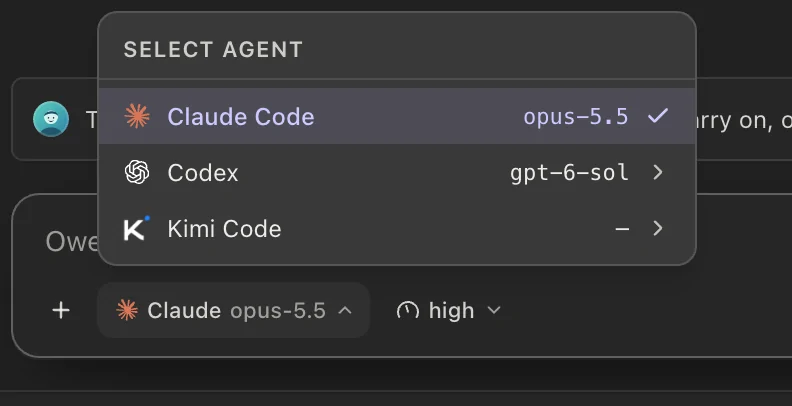
The model list has up to three parts: the agent's own models first, then Built-in (models Mirasim provides, on platform credit), then Your models (the profiles you configured). Reasoning level is offered only for models that support it.
Which agent to run
- Claude Code
- Anthropic's coding CLI, with its own sign-in and terminal UI.
- Codex
- OpenAI's terminal coding agent, with its own sign-in and terminal UI.
- Kimi Code
- Moonshot AI's coding agent, running the Kimi K models.
- DSH (DeepSeek Harness)
- DeepSeek's agent harness, running DeepSeek V4 models; signs in with a DeepSeek API key.
- Pi
- A minimal terminal agent that runs the models you add in Model Config.
- Antigravity
- Google's agent CLI, running the Gemini models.
- Qwen Code
- Alibaba's open-source coding agent for the Qwen3-Coder models.
- ZCode
- The ZCode CLI agent, running GLM models or a model provider you configure.
- Grok Build
- xAI's coding agent, running the Grok models on your account.
- OpenCode
- An open-source coding agent that uses the providers you set up in OpenCode, plus free models that need no sign-in.
If an agent is not installed yet, Agent Config installs it for you. Settings also shows each agent CLI's installed version next to the latest one.
Keep using the OpenCode you have
Mirasim runs the OpenCode already on your computer, with the accounts and models you set up in it. Nothing to move or enter again.
- Make OpenCode the default
Get started recognizes an OpenCode set up with your own account and asks whether to make it your default agent. Press Make default; your credit source switches to Account.
- Start a session
New sessions run on OpenCode. Pick a model next to the composer, or switch between build and plan.
- Accounts
- The accounts you signed in to with
opencode auth login, and the providers in your opencode.json. - Models
- The models OpenCode can use. Your default model in OpenCode and the ones you used recently come first, and the menu has a search box.
- Agents
- Its agents: build, plan, and the ones you defined yourself. Switch them per session.
Mirasim does not change OpenCode’s config files or move your keys. OpenCode sessions run on your own accounts and don’t use Mirasim credit.
Your sessions, both ways
- Sessions you started in OpenCode show up in Mirasim’s sidebar. Open one and keep going.
- To take a Mirasim session to the terminal, choose Copy resume command in the session’s ⋯ menu in the sidebar, then run it (
opencode -s <session ID>).
- Do I need to sign in to OpenCode?
- No. OpenCode’s free models work without signing in. To use your own accounts, run
opencode auth loginin a terminal first. - Where does the model list come from?
- From OpenCode itself. Add a provider in OpenCode, and its models appear in Mirasim’s menu.
- OpenCode 1.x or 2.x?
- Both work.
Bring your own keys
Model Config has three layers: providers (an endpoint plus a credential), profiles (one model on a provider, with its reasoning level and token limit), and bindings (which profile an agent uses). Anthropic, OpenAI, Google and any OpenAI-compatible endpoint, including OpenRouter, are supported.
# 1 · a provider: endpoint + credential
mirasim ui-cli --port 4970 provider save \
  --kind openai-compatible --name MyRouter \
  --base-url https://example.com/v1 --api-key sk-…

# 2 · a profile: one model on that provider
mirasim ui-cli --port 4970 profile save --provider PROVIDER_ID --model some-model

# 3 · a binding: route an agent through it, or back to its own subscription
mirasim ui-cli --port 4970 model bind --agent codex --profile PROFILE_ID
mirasim ui-cli --port 4970 model bind --agent codex --native

# test a provider with one real call
mirasim ui-cli --port 4970 model test --provider PROVIDER_ID --model some-model
Import an existing setup
Model providers already set up on this computer can come straight into Mirasim: CC Switch, claude-code-router, Claude Code’s and Codex’s own config files, and the ANTHROPIC_API_KEY / OPENAI_API_KEY lines in your shell. Only endpoints, API keys and model names come over. Keys are copied into the system keychain; the original tools and files are only read, never changed.
- Open the import dialog
Get started lists what it found, with an Import button. The first time it finds providers in CC Switch, it asks by itself: “Found N providers in cc-switch. Import them?” Any time later: Settings › Models › Import existing setup.
- Pick and import
Everything that can be imported is already ticked. Untick what you don’t want, then press Import N. The provider selected in the source becomes that agent’s default model, and Get started switches your credit source to Account.
Follow cc-switch
“Follow cc-switch” in the import dialog is on by default. While it is on, switching provider in CC Switch switches that agent’s default model in Mirasim too: Claude Code, Codex or Gemini CLI.
- A provider you add and select in CC Switch comes over on its own. If the selected one’s key changes, Mirasim’s copy follows.
- It only moves when CC Switch’s selection changes. A default model you change in Mirasim is not switched back.
- A switch made while Mirasim was closed is picked up the next time it opens.
- Mirasim only reads CC Switch’s data and never writes to it. To turn following off, reopen the dialog from Import existing setup and untick it.
Share with your team
“Share with members” only takes effect on a computer that is in a team space: members’ agents can then run on that model without seeing the key or the endpoint, and their turns are billed to that key, not to Mirasim credit. Using Mirasim only on your own computer? Ignore it. It starts unticked; tick it for each provider you want to share.
- Into a team space
Open the team space in the desktop app: Settings › Models › Import from this computer. It reads the setup on the computer you are using.
- Tick and import
Tick what to bring into the space and Share with members, then press Import N. The keys are written into the space.
On the web or a phone, carry it over as a package instead: on your computer, Settings › Models › Copy to another device › Export package, with Include API keys ticked; then in the space, Settings › Models › Import from your computer › Import package, and tick Share with members.
The 1M-token window
Some Anthropic models offer a one-million-token context window. To use it, choose the model's long-context variant, marked [1m]; it is never the default. Models without a 1M window do not show the variant.
Local models
Mirasim can run sessions on local inference: Ollama, plus mlx-lm on macOS. Other OpenAI-compatible local servers can be added as custom providers. Mirasim can detect what is installed, start a backend, and pull Ollama models with progress or delete them.
mirasim ui-cli --port 4970 local probe                       # what's installed
mirasim ui-cli --port 4970 local start --backend ollama      # bring it up
mirasim ui-cli --port 4970 local pull --model qwen3          # Ollama pull, progress on stderr
mirasim ui-cli --port 4970 local pulls                       # in-flight pulls
Several accounts, and live quota
You can store more than one account per agent and switch which one is active. The active account applies to the whole agent, not to each session.
Each stored account shows its live quota: the plan, remaining credits, how much of each current window is used, and when it resets. The state reads healthy, low or exhausted, and you can refresh it by hand.
To see every agent's quota and your platform credit at once, open the account card at the bottom left › Usage. Click a row to see its details and switch accounts.
mirasim ui-cli --port 4970 accounts --fresh                  # accounts + quota each
mirasim ui-cli --port 4970 usage                              # per-agent quota snapshots
mirasim ui-cli --port 4970 account use --agent claude --id work-account
Own account or platform credit
Each session runs on one of two routes: Own (your own accounts, API keys or local models) or Platform (Mirasim credit). The routes do not fall back to each other. When one runs out, switch the session to the other route.
- Set the default route
In Settings › Traffic monitor › Model routing, or under the account card at the bottom left › Usage › Platform, choose Own or Platform.
- Override one session
In the composer's model menu, set Quota source to Own, Platform or Follow global. It applies to that session only, from your next message.
mirasim ui-cli --port 4970 login                                  # sign in to Mirasim
mirasim ui-cli --port 4970 relay                                  # sign-in, credit and current route
mirasim ui-cli --port 4970 config set relay.mode=local            # default route: local = Own, cloud = Platform
mirasim ui-cli --port 4970 session route --session KEY --to own # one session: own | platform | defaultSomething wrong or missing on this page? Tell us