Use Kimi and GLM models in Claude Code and Codex
How Moonshot's and Z.ai's own guides connect Claude Code and Codex to Kimi and GLM models, what to watch out for, and picking them per session in Mirasim.
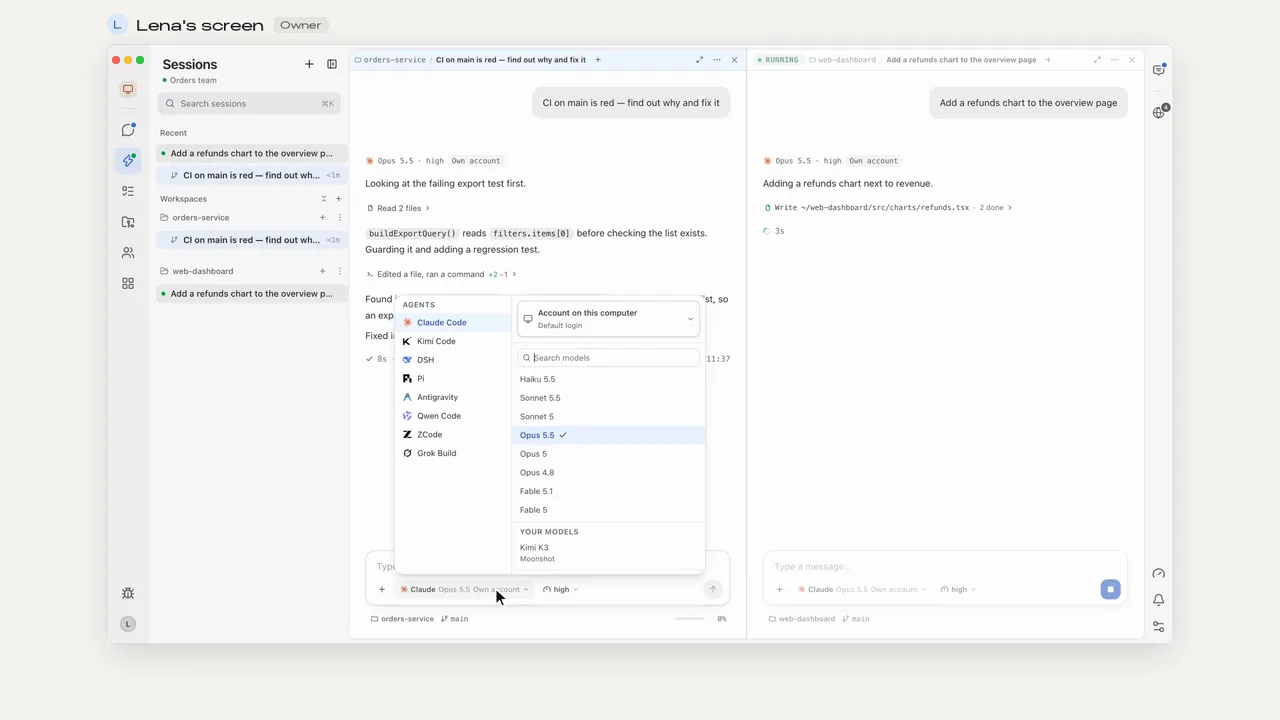
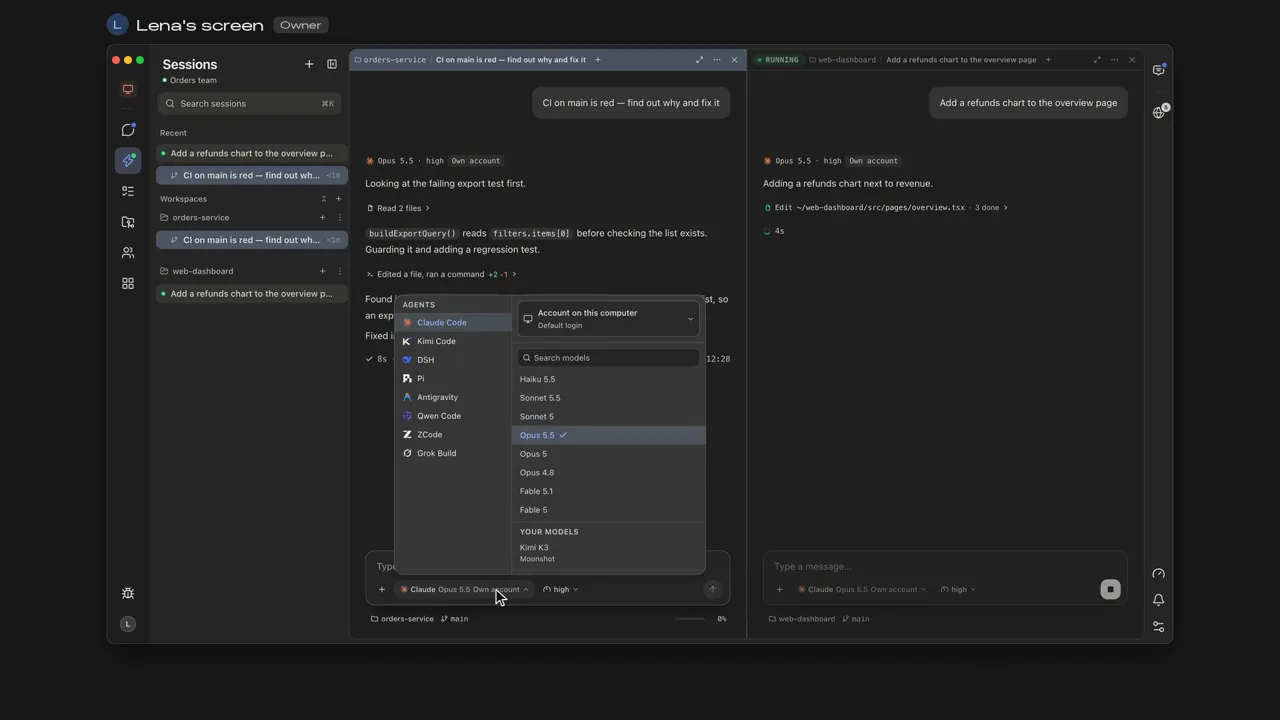
The short answer
Both Moonshot (Kimi) and Z.ai (GLM) offer an endpoint in Anthropic's format, so Claude Code can run on their models once you point a few environment variables at it. Codex speaks OpenAI's Responses API: Kimi supports it natively and needs one provider block in Codex's config.toml, and Z.ai has its own Responses endpoint with a longer setup. Either way, the change applies to that tool everywhere you use it. In Mirasim you add the key once and pick Kimi or GLM per session.
| Kimi (Moonshot) | GLM (Z.ai) | |
|---|---|---|
| For Claude Code | https://api.moonshot.ai/anthropic | https://api.z.ai/api/anthropic |
| For Codex | https://api.moonshot.ai/v1 (Responses API) | https://api.z.ai/api/v1 (Responses API) |
| Key | An API key from the Kimi API platform | A GLM Coding Plan key (separate from the standard API key) |
Kimi in Claude Code
{
  "env": {
    "ANTHROPIC_BASE_URL": "https://api.moonshot.ai/anthropic",
    "ANTHROPIC_AUTH_TOKEN": "YOUR_MOONSHOT_API_KEY",
    "ANTHROPIC_MODEL": "kimi-k3[1m]",
    "ANTHROPIC_DEFAULT_OPUS_MODEL": "kimi-k3[1m]",
    "ANTHROPIC_DEFAULT_SONNET_MODEL": "kimi-k3[1m]",
    "ANTHROPIC_DEFAULT_HAIKU_MODEL": "kimi-k3[1m]",
    "ANTHROPIC_DEFAULT_FABLE_MODEL": "kimi-k3[1m]",
    "CLAUDE_CODE_SUBAGENT_MODEL": "kimi-k3[1m]",
    "CLAUDE_CODE_AUTO_COMPACT_WINDOW": "1000000",
    "CLAUDE_CODE_EFFORT_LEVEL": "max"
  }
}- Set every model variable, not just one. Claude Code uses different model tiers for the main conversation, background tasks and subagents, and Moonshot warns that a tier left unset fails quietly.
- The env block in settings.json overrides the same variables exported in your shell. If another tool or an earlier setup wrote ANTHROPIC_* values there, clear them first, or the new settings won't take effect.
- The key is plain text in that file, so don't commit it to git. Restart Claude Code after editing.
Article · Claude Code settings.json: where it is, which file wins, and the settings worth changing → Claude Code settings.json: where it is and which file wins.
Kimi in Codex
model = "kimi-k3.1-pro"
model_provider = "kimi"
model_context_window = 1048576

[model_providers.kimi]
name = "Kimi"
base_url = "https://api.moonshot.ai/v1"
env_key = "KIMI_API_KEY"
wire_api = "responses"
Kimi's platform supports the Responses API that Codex uses, so this connects directly with no proxy. Keep the key in the environment variable rather than in config.toml. model_context_window matches the model's 1M-token window; without it Codex falls back to default model metadata. Restart the Codex desktop app after editing; the picker may show Custom while requests still go to kimi-k3.1-pro.
Article · Codex config.toml: where it is, and the settings worth changing → Codex config.toml: custom providers and the other settings.
GLM in Claude Code and Codex
- Get a GLM Coding Plan key from the Z.ai open platform. Keys for the individual plan, the team plan and the standard model API are managed separately and don't work for each other.
- For Claude Code, run Z.ai's helper,
npx @z_ai/coding-helper, which writes ANTHROPIC_BASE_URL and ANTHROPIC_AUTH_TOKEN into Claude Code's settings.json for you, or add them by hand with the base URL https://api.z.ai/api/anthropic. By default the Opus, Sonnet and Haiku tiers all map to GLM-5.3-Flash. - For Codex, Z.ai's guide uses the Responses endpoint https://api.z.ai/api/v1 and has you create a small model catalog file that config.toml points to. Follow Z.ai's Codex page for the exact files.
- Z.ai says the Coding Plan may only be used in its officially supported tools. Claude Code and Codex are both on that list.
Pick Kimi or GLM per session in Mirasim
- Add the key once
Settings › Models › Moonshot Kimi or Zhipu GLM, paste your API key
- Pick it in a session
Claude Code or Codex, under Your models in the model menu
- Keep the rest as is
Other sessions stay on Claude, GPT or anything else
- The model is chosen per session, so a Kimi session can run in the pane next to one on Claude. Mirasim translates between protocols where needed, so Claude Code and Codex can share the same key.
- No key? Built-in models include Kimi K3.1 Pro and GLM-5.3 Flash, on Mirasim credit.
- Your own Claude Code and Codex setups in the terminal stay as they are; nothing above is written into their files.
- Prefer Moonshot's own agent? Kimi Code runs in Mirasim too, next to the others.
Article · Kimi Code in Mirasim: a desktop app for Kimi Code CLI, next to your other agents → Kimi Code: your Kimi login, a Kimi API key or Mirasim credit.
Questions
- Do I still need a Claude or ChatGPT subscription?
- Not for these requests. While Claude Code or Codex points at Kimi or GLM, requests go to that provider and are billed to that key. You still install Claude Code or Codex as usual.
- My changes to settings.json don't take effect
- Close every Claude Code window and start a new terminal. Check the JSON is valid, and that no stale ANTHROPIC_* variable in settings.json or your shell config is overriding the new values.
- What about DeepSeek?
- DeepSeek works the same way; its own guides are covered in a separate page.
Article · Use DeepSeek in Claude Code and Codex: the official setup, and a per-session switch → DeepSeek in Claude Code and Codex: the official setup, and picking it per session.
Sources
Checked on November 26, 2026 against the Kimi API platform's guides (platform.moonshot.ai: Quickstart, Claude Code, Codex) and Z.ai's GLM Coding Plan documentation (docs.z.ai: Quick Start, Claude Code, Codex). Model names and endpoints change, so check those pages before you copy a config.
Keep reading
Code review with Claude Code and Codex: /review, GitHub reviews and a second opinion
Code review with Claude Code and Codex: /review for local changes, automatic GitHub PR reviews, where review rules go, and a second opinion from the other agent.
Hooks in Claude Code and Codex: run your own commands when the agent acts
What hooks are in Claude Code and Codex, where they go, when they fire, and examples: a notification, formatting after edits, blocking edits to protected files.
Claude Code and Codex permission modes: auto, plan, --dangerously-skip-permissions and --yolo
What each Claude Code and Codex permission mode allows without asking, what --dangerously-skip-permissions and --yolo turn off, and safer ways to get fewer prompts.